









|
Pic2Pic Pro are easy to
use and powerful utilities for batch
conversion of image files using scripts!
| |
 added support of 340+ image
formats added support of 340+ image
formats |
|
| |
improved DCR format reading |
|
| |
added multipage support for
PDF, GIF, TIF files |
|
| |
added "Replace filename"
option |
|
| |
improved add prefix/suffix
option |
|
| |
added "Add shadow" command |
|
| |
improved "Add border"
command |
|
| |
added new save parameters
for GIF, PNG, TIF, |
|
| |
 JPG, PCX, TGA, BMP, JP2 JPG, PCX, TGA, BMP, JP2 |
|
| |
improved TIF, GIF saving |
|
| |
fixed problem with saving
grayscaled JPG files |
|
| |
fixed minor bugs
|
|
| |
The following actions are
available |
|
| |
resize, crop, rotate and
mirror images |
|
| |
change color resolution |
|
| |
change image's brightness,
contrast, and gamma |
|
| |
change
color balance using the filters, which operate |
|
| |
in RGB,
CMY, YCbCr, HLS, and HSV color spaces |
|
| |
modify
images using the sharpen, detail, smooth, blur, |
|
| |
and contour
effects |
|
| |
add transparency watermarks
and borders |
|
| |
replace one color with
another |
|
| |
convert
images to BMP, JPG, GIF, PBM, PGM, PNG, |
|
| |
PPM, TGA,
TIF image formats |
|
| |
rename converted files |
|
| |
make a transparent GIF |
|
| |
change a resolution (dots
per inch) for JPG-files |
|
| |
conversion with saving path
info of an original file
|
|
| |
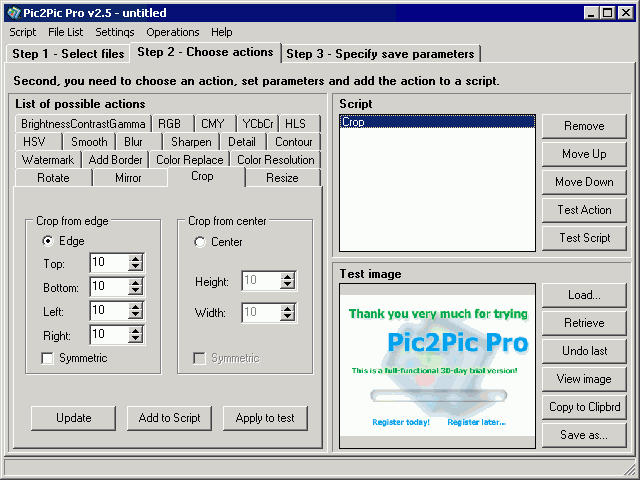
To convert image files using Pic2Pic Pro you need
to |
|
| |
select files you want to convert and add them to |
|
| |
the File List; |
|
| |
choose an action, set parameters and add the |
|
| |
action to a script; |
|
| |
specify save parameters and press the Start button |
|
| |
to begin the conversion.
|
|
| |
Supports 340+ input file formats including:
BMP, DCR, EMF, GIF, ICO, JPEG, JPG, PBM, PCX, PGM,
PNG, PPM, TIF, TIFF, TGA, WMF
|
|
| |
Output file formats:
BMP, JPG, GIF, PBM, PGM, PNG, PPM, TGA, TIF, PCX, JP2
|
|
| |
System requirements:
Windows 95/98/ME/NT/2000/XP, 6Mb free HDD space,
32Mb RAM, Pentium 90Mhz processor.
|
|
|
|